
Description
- High-concerned chemical: None
- Doorbell: Yes
- Material: Aluminum alloy + tempered glass
- Camera: COLOR
- IP Camera Interface: Yes
- Access Control: Inductive Card
- Waterproof: Yes
- Samrt Home Interface: Yes
- Installation: Wall Mounting
- Communication Interface: WireLess
- Zone Input: None
- Display Screen Type: Color Touch Screen
- Type: intercom system
- Viewing Angle (°): 110
- Kit Configuration: One to One video doorphone
- Display Screen Size(inch): 7
- Answering Mode: Hands-free
- Camera Sensor type: CMOS
- Connection Method: WireLess
- Brand Name: MDNG
- Origin: Mainland China
- Smart home platform: Tuya
- Resolution: 1080p
- Plug Type: EU Plug
- Certification: CE
- Technology: DIGITAL
- Item: 2 Wires IP Video Intercom
- Network: 2.4GWIFI
- APP: Tuya Smart/ Smart Life
- Night Vision: Support
- PIR Motion Detection: Support
- Video & Photo Recording: Support
- Waterproof: Support
- System password: 666666


Product introduction:
Indoor Monitor
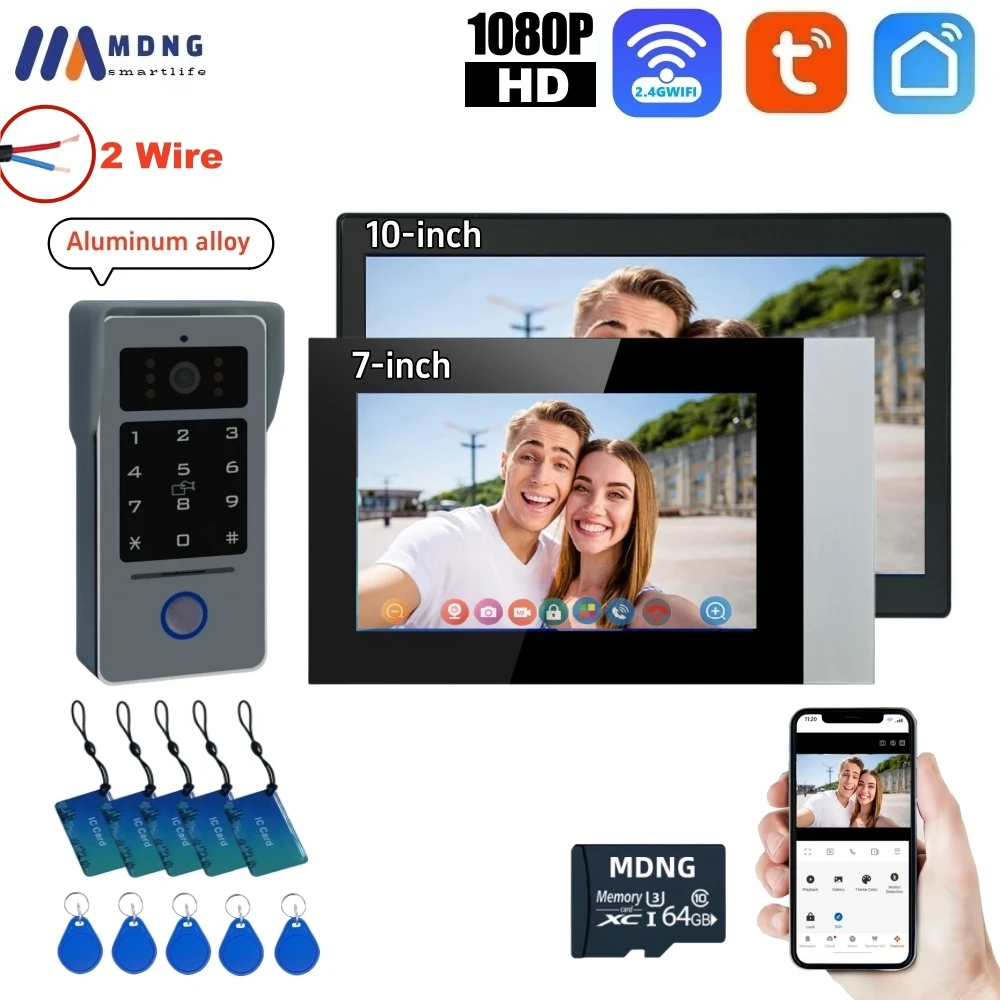
♦7 Inch /10 Inch Color Touch Screen
♦Supports Tuya smart / smart life app ,Easily connect the monitoring to more than one smartphone in less than two minutes. Quite simple operation! (Device can be shared to more family members in Tuya APP)
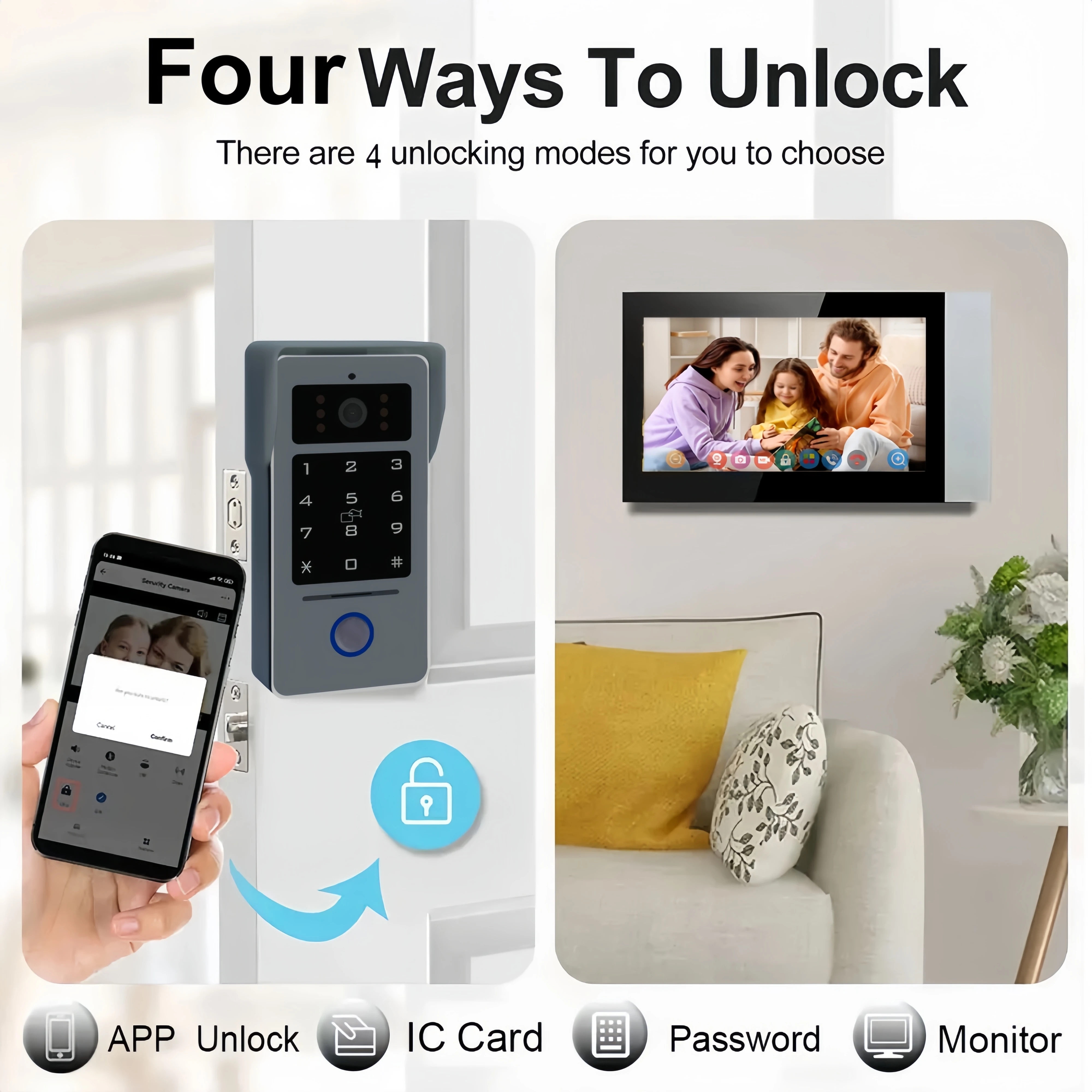
♦Screen Answering, Monitoring And Unlocking
♦Connection type: Indoor monitor WiFi wirelessly/wired to Internet,2 wire cable from indoor monitor to the outdoor door phone
♦Enhanced Features: calendar display, adjustment options for brightness, contrast and color, visitor records.Adjustable Color, Brightness and volume
♦Built-in Memory Can Save 86 Pictures, Support External Max.128GB SD Card(not including)
♦Security Lock Control: Offers compatibility with magetic locks and electric locks, complete with locking delay time settings.
♦System Password: 666666
♦Conversation duration:Whithin 120s
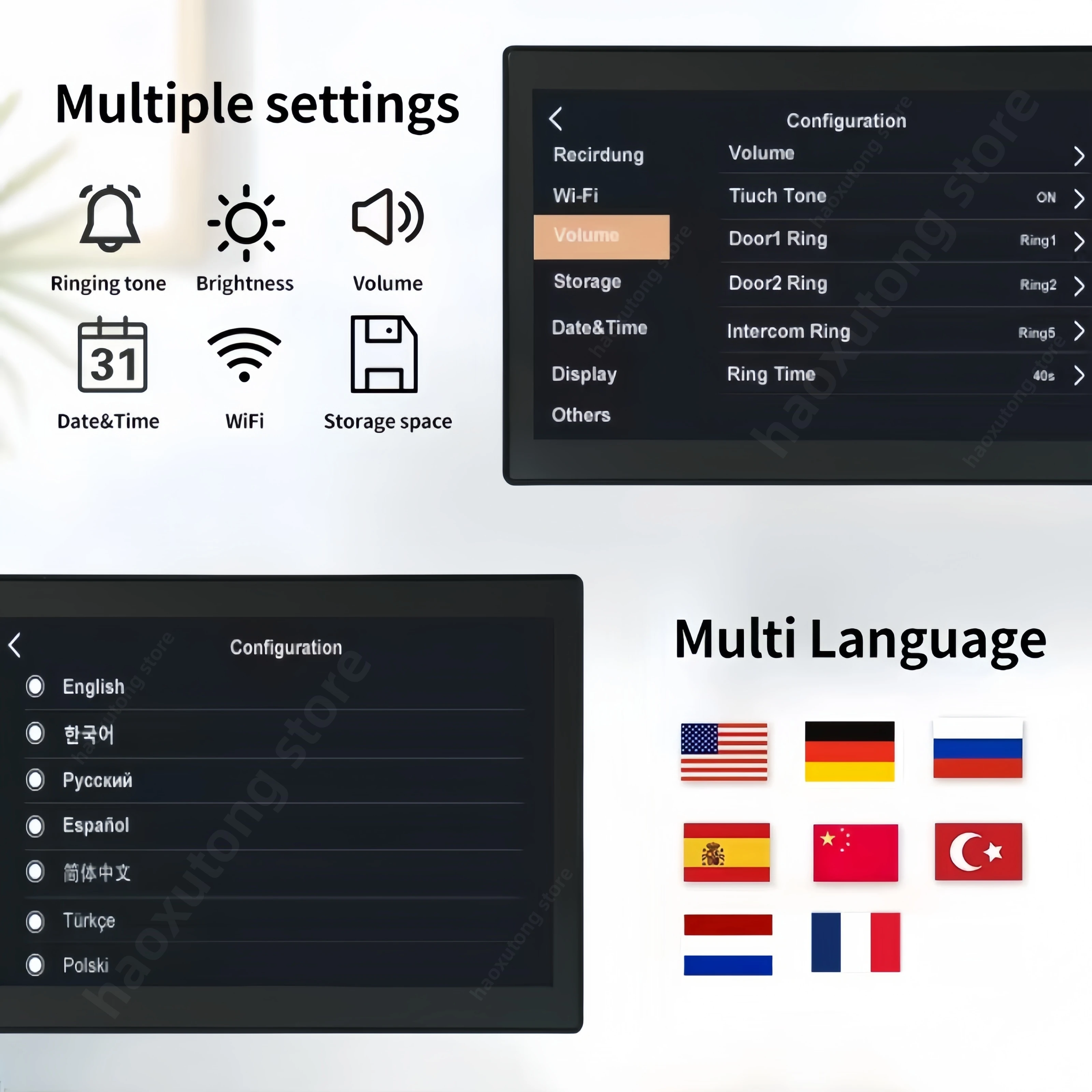
♦Supports Chinese ,English ,German,French,Russia ,Spanish,Deutsch,Framcias ,Nederlands
♦Default EU plug (required 18V 2A power adatper.)
—Camera: 1080P Camera
—Coming with IR Sensor, Night Vision turn On/off Automatically.
—Wiring method: RVV2 Wires Connection
—PIR Motion Detection. It will record image and videos automatically when someone presses the bell or Motion is detected.
— Waterproof design,work stable in rainy,cloudy,cold and snow day.
—Camera View angle: 110°
—Operating temperature range: -20 to +60℃
—Host material: Aluminum alloy + tempered glass
—Password & RFIC Card Unlocking: Provides the convenience of IC card unlocking (IC cards included)
Tuya smart /smart life app and phone Remote and Unlock
easily talks with visitors through the app, which supports IOS/Android smartphones and tablets. Support remote unlocking, monitoring, Two-way communication, video recording, etc. You can answer the door in your hand.

2-wire connection design

Enhanced Features: calendar display, adjustment options for brightness, contrast and color, visitor records.
Supports Chinese ,English ,German,French,Russia ,Spanish,Deutsch,Framcias ,Nederlands
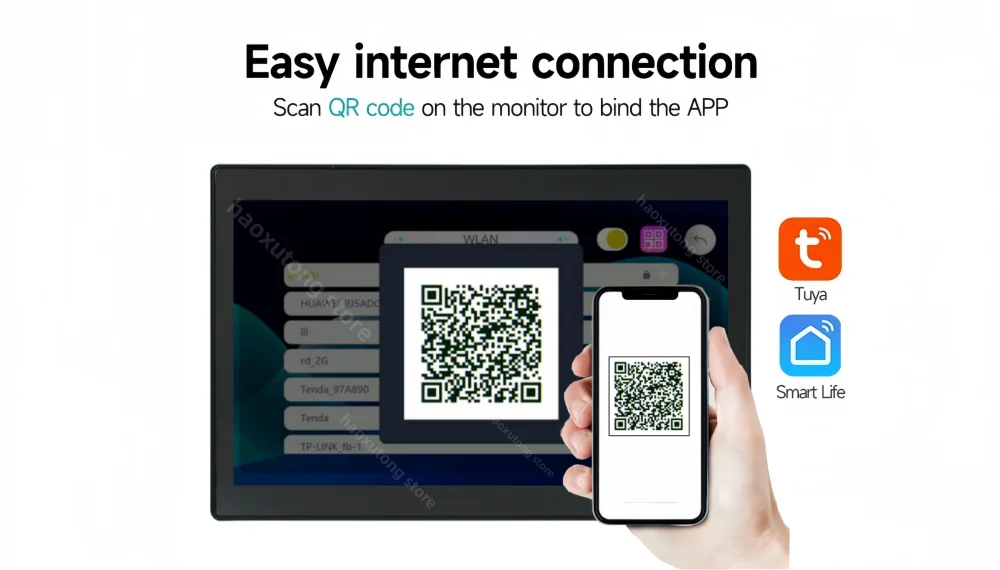
Upgrade the wifi connection mode
After downloading the Tuya app, Just scan the QR code to connect to the app,you can connect the monitoring device to your smartphone in less than two minutes.The operation is simple and safe.
High Definition 1080P Cmera with 110 °wide angle lens

Motion Detection and Video/Picture Record


IP65 waterproof, adapt to extreme temperature difference, not affected by weather


About Password Setting :
Outdoor Sta*on Password Keypad User Manual
Press any key to light up the keypad, entering input mode. A "beep" sound indicates a valid key press. Press "#" to confirm; four "beeps" indicate an
error or failed setup. Press "*" during input for four "beeps" to exit input mode. Afer 30 seconds of inacBvity, the system automaBcally exits with three "beeps." Factory default admin password: 666666, Factory default unlock password: 666666
1. Enter Setup Mode: Press # 666666 #. A single "beep" confirms entry into setup mode. The default admin password is 666666. It is recommended to change the admin password and remember the new one. All subsequent operaBons must be performed in setup mode.
2. Change Admin Password: Press 5 #, hear two "beeps," enter a new 6-digit admin password, and press # to confirm. A single "beep" indicates success. Press * to exit setup mode.
3. Change Unlock Password: Press 1 #, hear two "beeps," enter a new 6-digit unlock password, and press # to confirm. A single "beep" indicates success. Press * to exit setup mode.
4. Delete Unlock Password: Press 3 #, hear two "beeps," press # again to confirm. A single "beep" indicates success. Press * to exit setup mode.
5. Add IC Cards: Press 7 #, hear two "beeps," then add IC cards to the recogniBon area within 30 seconds. Press # to confirm. A single "beep" indicates success. Press * to exit setup mode.
6. Delete IC Cards: Press 9 #, hear two "beeps," press # again to confirm. A single "beep" indicates success. Press * to exit setup mode.7. Restore Factory Settings: Press 4 #, hear two "beeps," press # again to confirm. A single "beep" indicates success. The admin password will reset to 666666, and the unlock password will reset to 666666.
Product Size:


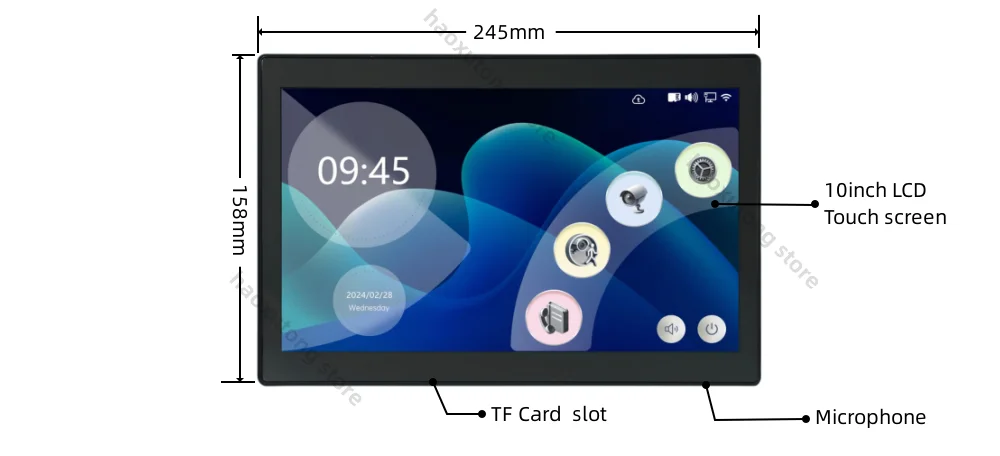
Technical parameter
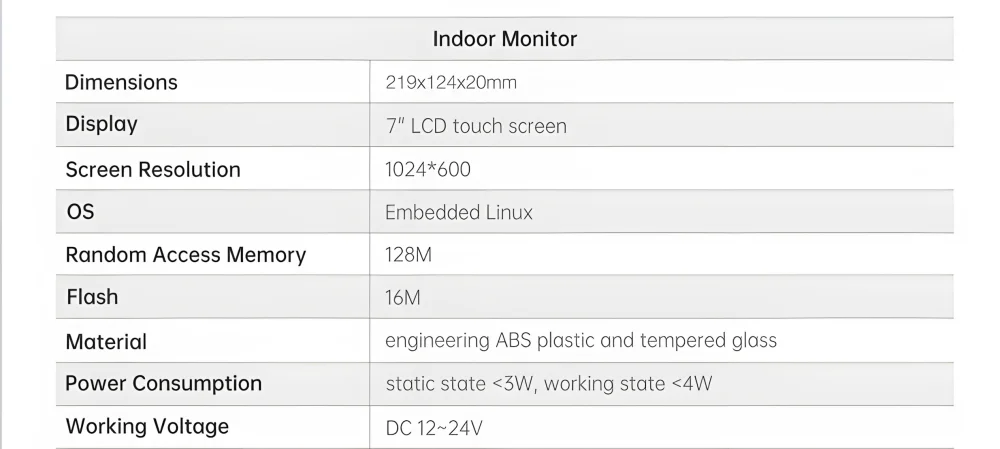
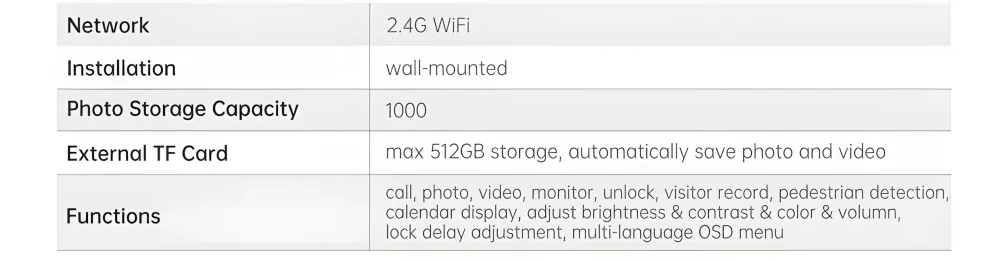
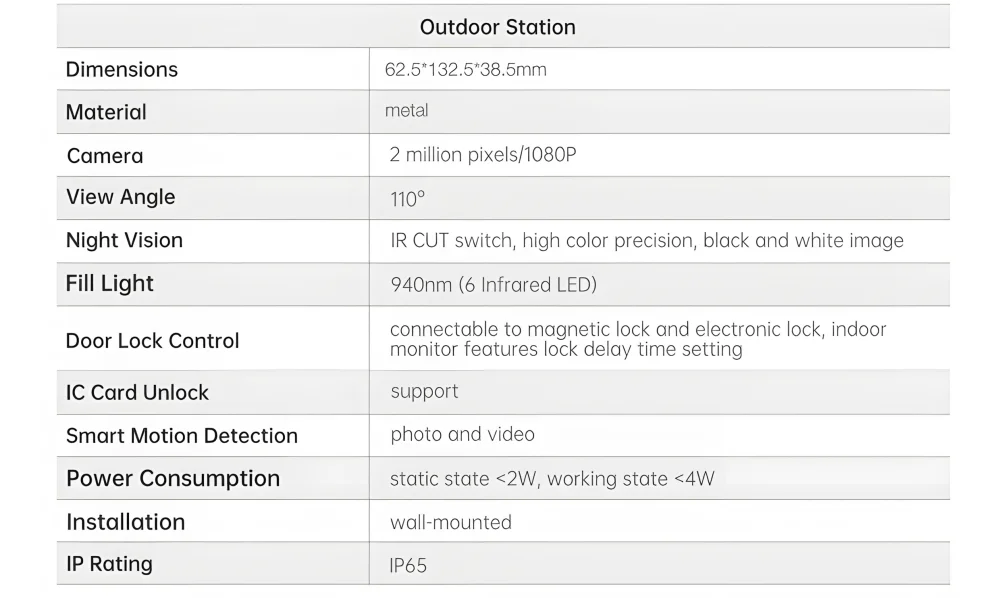
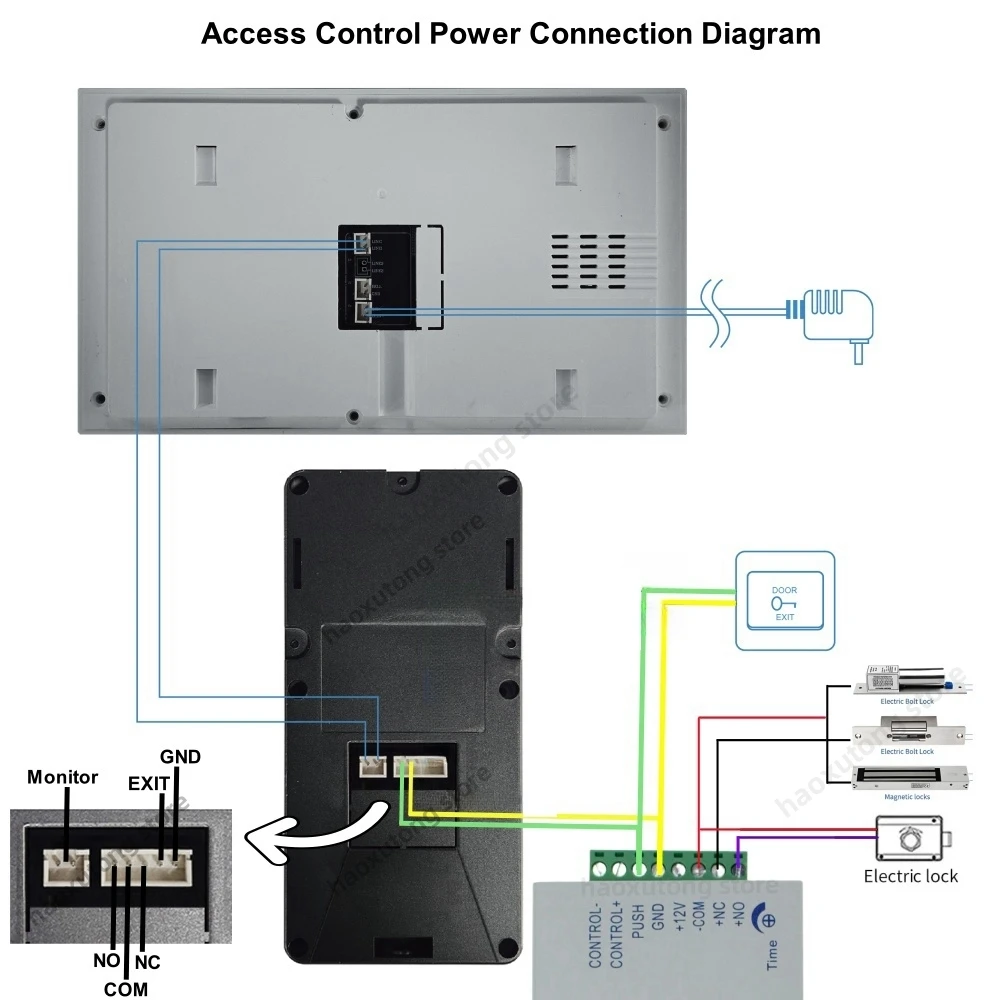
This video intercom can connect to many electric locks. New Dual doors Unlock Design : You can open the door with the indoor monitor. Very convenient!
* Part of the equipment in the wiring diagram is not included in the package, need to buy additional, details can contact customer service

Packing List :

Additional information
| High-concerned chemical | None |
|---|---|
| Doorbell | Yes |
| Material | Aluminum alloy + tempered glass |
| Camera | COLOR |
| IP Camera Interface | Yes |
| Access Control | Inductive Card |
| Waterproof | Support |
| Samrt Home Interface | Yes |
| Installation | Wall Mounting |
| Communication Interface | WireLess |
| Zone Input | None |
| Display Screen Type | Color Touch Screen |
| Type | intercom system |
| Viewing Angle (°) | 110 |
| Kit Configuration | One to One video doorphone |
| Display Screen Size(inch) | 7 |
| Answering Mode | Hands-free |
| Camera Sensor type | CMOS |
| Connection Method | WireLess |
| Brand Name | MDNG |
| Origin | Mainland China |
| Smart home platform | Tuya |
| Resolution | 1080p |
| Plug Type | EU Plug |
| Certification | CE |
| Technology | DIGITAL |
| Item | 2 Wires IP Video Intercom |
| Network | 2.4GWIFI |
| APP | Tuya Smart/ Smart Life |
| Night Vision | Support |
| PIR Motion Detection | Support |
| Video & Photo Recording | Support |
| System password | 666666 |
| Color | 10 inch monitor, V07PWIFI-IPD, V07PWIFI-IPD-64G, V10PWIFI-IPD, V10PWIFI-IPD-64G |
1 review for 2 Wire Video Doorphone1080P Tuya Smart Wifi 7″ Touch Screen Password Keybords Card Outdoor Videophone Intercom System for Home
Vendor Information





D***d (verified owner) –
Very good products, easy to install , support tuya &smart life 👍 👍