
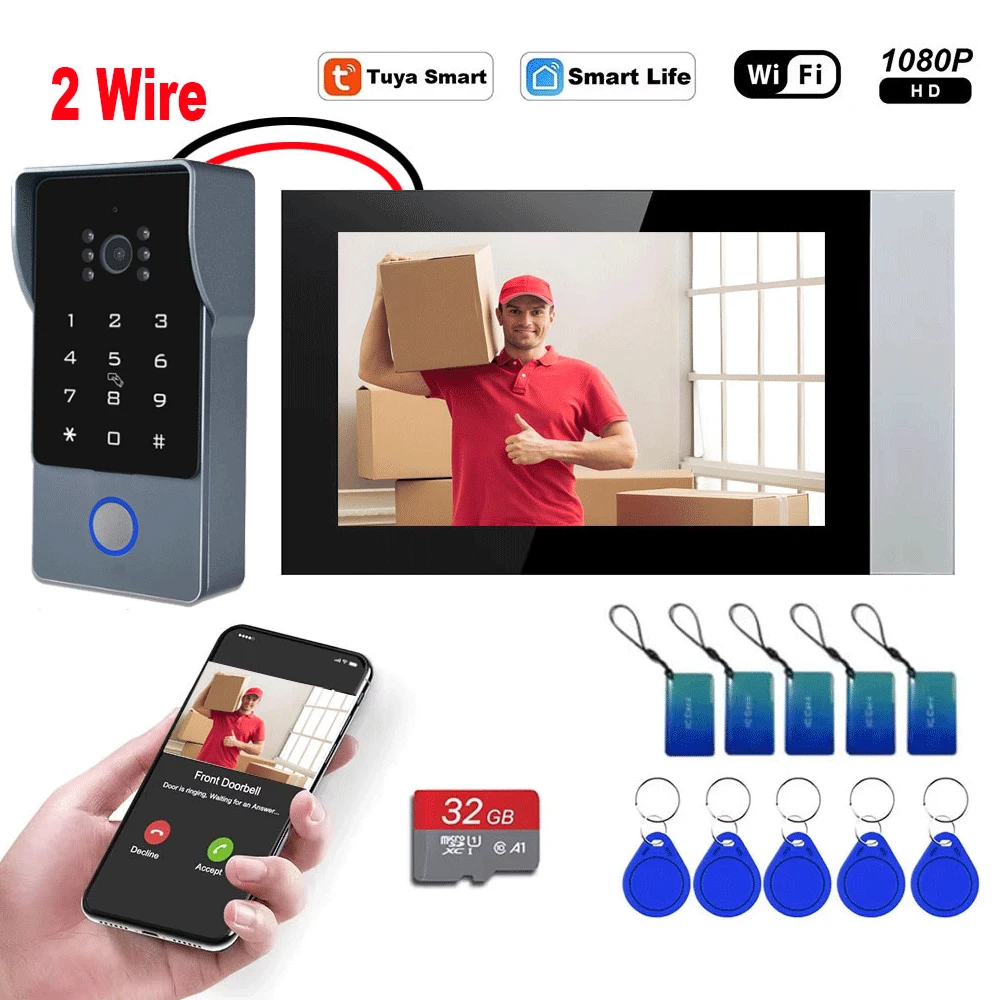
Description
- High-concerned chemical: None
- Size: 7" TFT LCD video doorphone
- Doorbell: Yes
- Material: ABS
- Sensor Size(Inch): 1/3
- IP Camera Interface: No
- Access Control: Password
- Waterproof: Yes
- Samrt Home Interface: Yes
- Installation: Wall Mounting
- Communication Interface: Wired
- Zone Input: None
- Display Screen Type: Color Touch Screen
- Type: intercom system
- Viewing Angle (°): 140
- Kit Configuration: One to One video doorphone
- Display Screen Size(inch): 7
- Answering Mode: Hands-free
- Camera Sensor type: CCD
- Connection Method: Wired
- Brand Name: HSmart HD
- Origin: Mainland China
- Smart home platform: Tuya
- Resolution: 1080p
- Plug Type: EU Plug,US Plug,AU Plug,UK Plug
- Certification: CE
- Power (W): 220v
- 7 inch LCD Memory:: Support Max. 32GB SD card
- Keypad:: Touch button
- HD 1080P Camera: View Angle lens:2.8mm 110 Degree
- Remote Control Support:: Iphone,Android Phone,Ipad,PC
- Outdoor Camera:: Support night vision
- Tuya smart app: support video door phone intercom system
- Outdoor Camera Resolution:: AHD 1080P
- Motion Detection:: Support
- Doorbell Operating Tempe: -40℃ ~ + 60℃
- Electronic Locks Connection:: Support
- Doorbell Perspective:: 140°
- HD 1080P Resolution:: 7 inch TFT LCD Touch Monitor
- Type: Intercom System: Waterproof: Yes
New 1080P 7 inch 4in1 Unlock Wifi Doorbell Two-Wire Video Intercom System Video Door Phone Camera with Motion Detector Security

2 Wire Smart Home Tuya Wifi 1080P Video Intercom 7'' Color Touch Screen Private Residences Security System
– Coming with IR Sensor, Night Vision turn On/off Automatically.
– Waterproof design,work stable in rainy,cloudy,cold and snow day.

– Connection type: Indoor monitor WiFi wirelessly/wired to Internet,2 wire cable from indoor monitor to the outdoor door phone

4in1 Unlock Wifi Doorbell 2 Wire Video Intercom System For Home Doorphone Tuya Smart 1080P Touch Monitor Security Protect
2-Wires Single House Video Intercom System(tuya)

Clock & Date Mode
Clock & Date Mode , it is also a beautiful decoration.
Clock & Date Mode
The display time can be set and can be turned on for continuous display!


Multi-languages TUYA system
The system supports many different languages: English, Russian, German, French, Dutch, Turkish, Spanish languages

4 in 1 Unlock
This device has various unlocking methods. You can unlock by , password,monitor, IC card, APP and screen. It is very convenient and flexible.

Motion Detection FunctionIf you open the Motion Detection Function, it will record the video or snapshots automatically, and you can see what happen on your monitor, Which will keep your house more Safe.


Product introduction:
Video recording:When visitors press the doorbell, the doorbell camera will automatically record videos or instant photos and save them to the additional Micro SD card to protect your home every day. You can check the recording at any time from a monitor or a smartphone.
SD Card: This video intercom supports SD cards up to 128G, which you need to buy separately and which are not included in the box.


Waterproof night vision
IP65 waterproof design ensures stable operation in rainy, cloudy, cold, and snowy conditions. Built in 1080P high-definition camera, anti alumina alloy front panel, rainproof, dustproof, and damage resistant. LED infrared night vision effect is better.
Excellent Performance

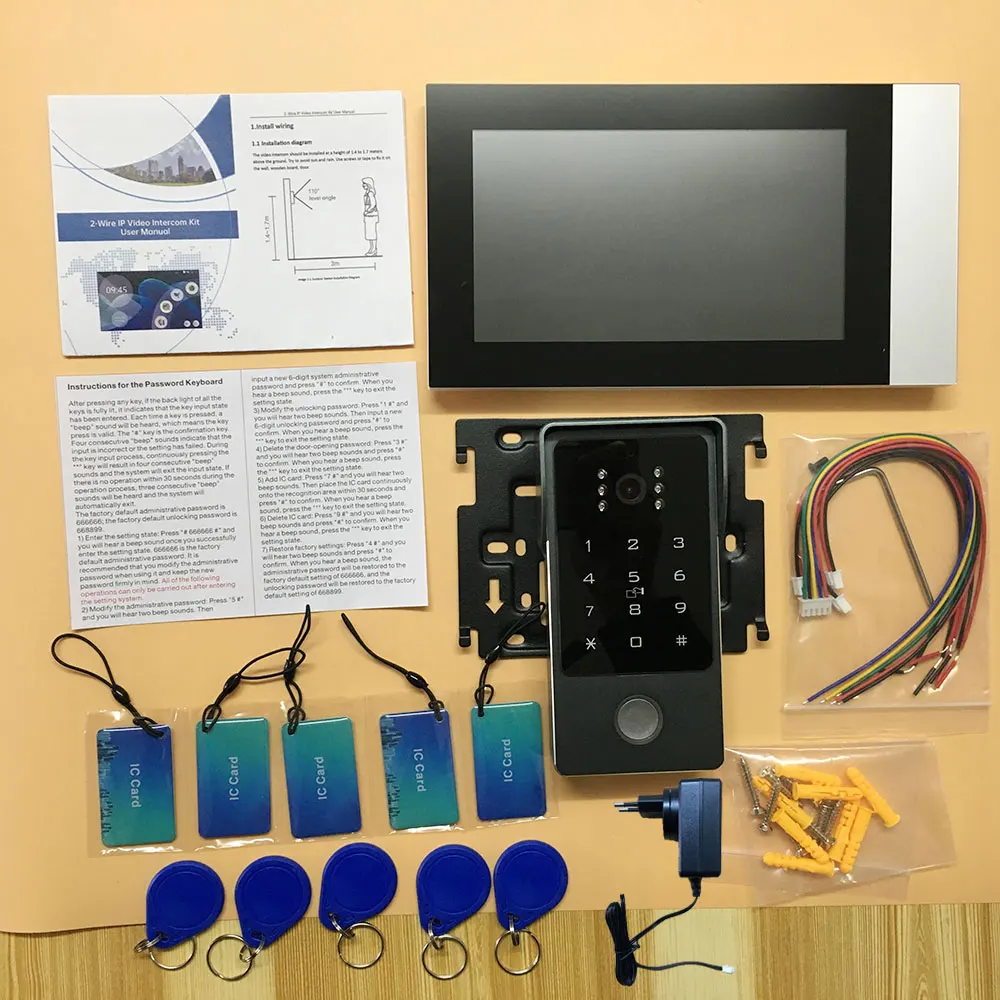
Package Included:


Outdoor Sta*on Password Keypad User Manual
1,Press any key to light up the keypad, entering input mode. A "beep" soundindicates a valid key press. Press "#" to confirm; four "beeps" indicate anerror or failed setup. Press "*" during input for four "beeps" to exit inputmode. ATer 30 seconds of inacBvity, the system automaBcally exits withthree "beeps.
"Factory default admin password: 666666, Factory default unlockpassword: 668899
2. Enter Setup Mode: Press # 666666 #. A single "beep" confirms entryinto setup mode. The default admin password is 666666. It isrecommended to change the admin password and remember the newone. All subsequent operaBons must be performed in setup mode.2. Change Admin Password: Press 5 #, hear two "beeps," enter a new 6-digit admin password, and press # to confirm. A single "beep" indicatessuccess. Press * to exit setup mode.
3. Change Unlock Password: Press 1 #, hear two "beeps," enter a new 6-digit unlock password, and press # to confirm. A single "beep" indicatessuccess. Press * to exit setup mode.4. Delete Unlock Password: Press 3 #, hear two "beeps," press # again toconfirm. A single "beep" indicates success. Press * to exit setup mode.5. Add IC Cards: Press 7 #, hear two "beeps," then add IC cards to therecogniBon area within 30 seconds. Press # to confirm. A single "beep"indicates success. Press * to exit setup mode.
4. Delete Unlock Password: Press 3 #, hear two "beeps," press # again toconfirm. A single "beep" indicates success. Press * to exit setup mode.
5. Add IC Cards: Press 7 #, hear two "beeps," then add IC cards to therecogniBon area within 30 seconds. Press # to confirm. A single "beep"indicates success. Press * to exit setup mode.
6. Delete IC Cards: Press 9 #, hear two "beeps," press # again to confirm. Asingle "beep" indicates success. Press * to exit setup mode.7. Restore Factory SeMngs: Press 4 #, hear two "beeps," press # again toconfirm. A single "beep" indicates success. The admin password will resetto 666666, and the unlock password will reset to 668899.
Wiring Instruction
It is a 2-wire system, we will provide 2 core connectors in the package, you need use 2 core cable to do the connection. Please refer to below wiring.(Please note the e-lock / Power Supply BOX at below photo is not included, if you need, please feel free to contact us)


Tuya smart /smart life app and phone Remote and Unlock
easily talks with visitors through the app, which supports IOS/Android smartphones and tablets. Support remote unlocking, monitoring, Two-way communication, video recording, etc. You can answer the door in your hand.
About Wireless Connetion:
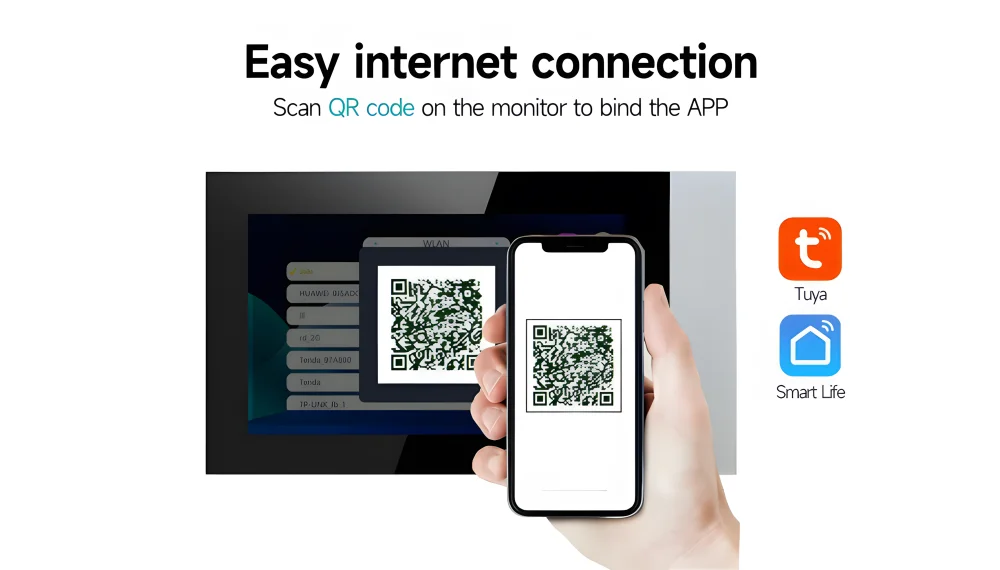
Wifi video intercom system does not mean you don’t need wire any cable.The monitor support WIFI network(only connect with 2.4GHZ router band), but the indoor monitor and doorbell is Wired.
pgrade the wifi connection mode
After downloading the Tuya app, Just scan the QR code to connect to the app,you can connect the monitoring device to your smartphone in less than two minutes.The operation is simple and safe.


Additional information
| Color | Password IC Card |
|---|---|
| High-concerned chemical | None |
| Size | 7" TFT LCD video doorphone |
| Doorbell | Yes |
| Material | ABS |
| Sensor Size(Inch) | 1/3 |
| IP Camera Interface | No |
| Access Control | Password |
| Waterproof | Yes |
| Samrt Home Interface | Yes |
| Installation | Wall Mounting |
| Communication Interface | Wired |
| Zone Input | None |
| Display Screen Type | Color Touch Screen |
| Type | intercom system |
| Viewing Angle (°) | 140 |
| Kit Configuration | One to One video doorphone |
| Display Screen Size(inch) | 7 |
| Answering Mode | Hands-free |
| Camera Sensor type | CCD |
| Connection Method | Wired |
| Brand Name | HSmart HD |
| Origin | Mainland China |
| Smart home platform | Tuya |
| Resolution | 1080p |
| Plug Type | EU Plug,US Plug,AU Plug,UK Plug |
| Certification | CE |
| Power (W) | 220v |
| 7 inch LCD Memory: | Support Max. 32GB SD card |
| Keypad: | Touch button |
| HD 1080P Camera | View Angle lens:2.8mm 110 Degree |
| Remote Control Support: | Iphone,Android Phone,Ipad,PC |
| Outdoor Camera: | Support night vision |
| Tuya smart app | support video door phone intercom system |
| Outdoor Camera Resolution: | AHD 1080P |
| Motion Detection: | Support |
| Doorbell Operating Tempe | -40℃ ~ + 60℃ |
| Electronic Locks Connection: | Support |
| Doorbell Perspective: | 140° |
| HD 1080P Resolution: | 7 inch TFT LCD Touch Monitor |
| Type: Intercom System | Waterproof: Yes |
Vendor Information





Reviews
There are no reviews yet.