
Description
- Battery Included: No
- High-concerned chemical: None
- Wear-resistant joysticks: No
- Trigger Button Type: None
- Package: Yes
- Compatible Brand/Model: PC
- Brand Name: DATA FROG
- PC System: Windows 10
- Origin: Mainland China
- Type: Gamepads
- Controller Type 1: retro emulator controller
- Controller Type 2: emulator game controller
- Controller Type 3: retro game controller
- Gaming Style 1: arcade gamepad
- Gaming Style 2: arcade controller
- Gaming Style 3: classic arcade game controller
- Emulator Type 1: mame controller
- Emulator Type 2: classic game emulator controller
- Compatible Platform 1: pc retro gaming
- Compatible Platform 2: android emulator controller
- Connection Type 1: 2.4ghz retro controller
- Connection Type 2: wireless retro controller
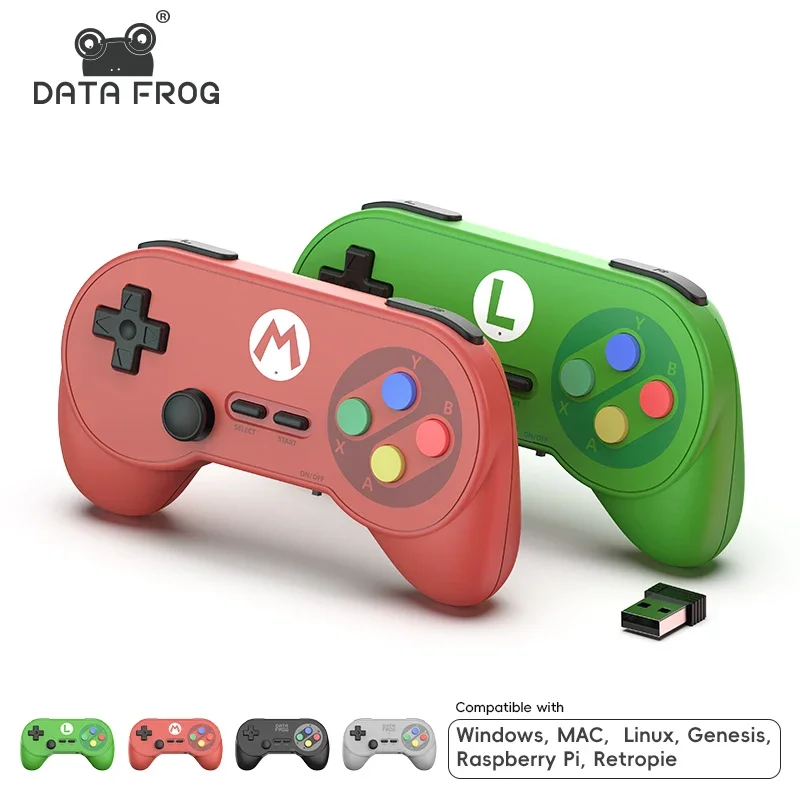
Data Frog PC07 Retro Wireless Gamepad with Dual Receiver, Classic Controller for PC DInput, Android, Arcade Emulators
– Classic Retro Design for Endless Multiplayer Fun
Ergonomic retro-style controllers with 2.4GHz wireless technology, ideal for Android devices, TV boxes, and PC games (DInput only). Perfect for retro arcade, emulators, and casual games with dual-player support.

– Stable 2.4GHz Wireless Connection + Dual Receiver
Built-in 2.4GHz signal transmission ensures an ultra-stable connection up to 10 meters without interference. Dual USB receiver design supports two players simultaneously — no Bluetooth required!

– Long Battery Life & Power-Saving Mode
Powered by 1 AAA batteries per controller, delivering up to 32 hours of continuous play. Intelligent auto-sleep activates after inactivity, and quick START button wake-up conserves power efficiently.

– Durable Build & Comfortable Grip
Features 1,000,000+ key press lifespan, 130g key force, and premium silicone buttons for responsive control. Classic gamepad shape provides long-lasting comfort for retro and modern gaming sessions.

– Easy Plug & Play Setup
Simply insert the receiver, turn on the controller, and start playing instantly. Supports Digital/Analog modes with a quick combo switch (R1 + L1 + SELECT). Compatible with most emulators and PC games — no drivers needed.

Additional information
| Color | black, Grey, Red and Green |
|---|---|
| Battery Included | No |
| High-concerned chemical | None |
| Wear-resistant joysticks | No |
| Trigger Button Type | None |
| Package | Yes |
| Compatible Brand/Model | PC |
| Brand Name | DATA FROG |
| PC System | Windows 10 |
| Origin | Mainland China |
| Type | Gamepads |
| Controller Type 1 | retro emulator controller |
| Controller Type 2 | emulator game controller |
| Controller Type 3 | retro game controller |
| Gaming Style 1 | arcade gamepad |
| Gaming Style 2 | arcade controller |
| Gaming Style 3 | classic arcade game controller |
| Emulator Type 1 | mame controller |
| Emulator Type 2 | classic game emulator controller |
| Compatible Platform 1 | pc retro gaming |
| Compatible Platform 2 | android emulator controller |
| Connection Type 1 | 2.4ghz retro controller |
| Connection Type 2 | wireless retro controller |
Vendor Information




Reviews
There are no reviews yet.