
Description
- High-concerned chemical: None
- 5G Wi-Fi Transmission Rate: None
- Wired Transfer Rate: 10/100Mbps
- Wi-Fi Transmission Standard: 802.11g
- 2.4G Wi-Fi Transmission Rate: 300 Mbps
- Wi-Fi Supported Frequency: 2.4G
- Supports WPS: Yes
- WAN Ports: 0
- LAN Ports: 2
- Function: Firewall
- Application: Multi-service
- Package: Yes
- Standards And Protocols: Wi-Fi 802.11g,Wi-Fi 802.11b,Wi-Fi 802.11n
- Wireless transmission rate: 300m
- Support Mesh: Not Supported
- Frequency: 2.4 GHz
- Antenna Type: Internal
- Recommended Uses: Home
- Wireless Communication Standard: 802.11.ax
- Frequency Band Class: Single-Band
- Max. LAN Data Rate: 300Mbps
- With Modem Function: No
- Type: WireLess
- Brand Name: DBIT
- Origin: Mainland China
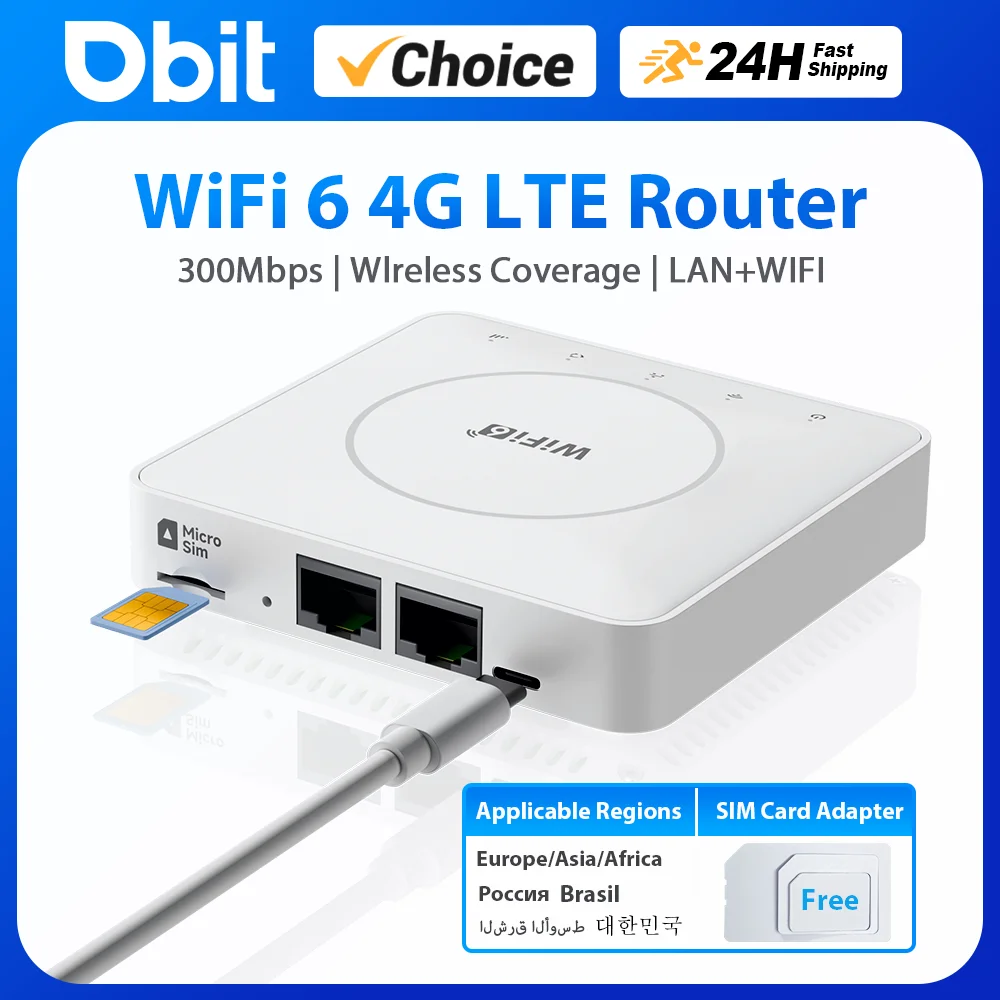
2025 DBIT New WiFi 6 4G LTE Router is a mini portable router with excellent wireless access performance and comprehensive routing functions. It converts high-speed TDD/FDD signals into WiFi signals on the local area network (LAN), providing wireless broadband data to end users. The router is compatible with mainstream frequency band SIM cards in Europe, Asia and Africa, and can be connected to the Internet with simple configurationEasily meet the network needs of wireless and wired devices.
Router supported frequency bands
FDD LTE:B1/B3/B7/B8/B20/B28
TDD LTE:B38/B40/B41
WCDMA:B1/B8
Applicable to Europe, Africa, Asia, all countries and regions, such as Russia, Israel, South Korea, Spain, Brazil, Ukraine, France, Italy, Netherlands, India, Nigeria, Switzerland, Kazakhstan, Poland, Ghana, etc.
Note: This device does not include a SIM card. It supports standard 4G/5G SIM cards (the device is compatible with 5G SIM cards but only supports 4G band wireless WiFi, not 5G band operation). It does not support contract SIM cards (contract cards typically refer to cards dedicated to fixed devices or SIM cards that can only be used on specified devices under a contract, or SIM cards that are purely 5G band).
The speed descriptions in the product details/description are theoretical data tested in professional laboratories. Network speed is not a fixed value and changes every second. During use, the network will be affected by the actual network environment. Please refer to the actual usage speed.
Product features:
*Support 4G to WiFi, 4G to LAN (2*LAN ports)
*Support WiFi6 2.4G wireless WiFi up to 300Mbps
*CAT4 LTE WiFi DL150Mbps/UL50Mbps
*Access up to 32 devices
*Support WiFi hiding, SSID broadcast function
*Support port filtering, port mapping, watchdog
*Support frequency band locking
*Support FOTA remote upgrade function
*Support TCP/UDP/PPP/HTTP/NITZ/NDIS/NTP/HTTPS/PING/PAP/CHAP protocols
Operation instructions and FAQs are at the bottom of the details page


Packing List:
1* Router
1* Power Cable
1* SIM Card Adapter
Note: The router supports 5V-12V/1A power supply. To avoid interface compatibility issues, please try to use the original power cable for power supply.
Quick Instructions:
1. Insert a valid SIM card
2. Power on the Device
3. Connect to the WiFi (SSID: CLM920-XXXX)
4. Enter WiFi Password: 12345678
5. Use a connected router WiFi device to open a browser and access the router IP management center URL. After logging in, you can check the router status/configure router information (see the nameplate on the bottom of the router for information)
Note: After the router is powered on and started, any mobile phone or computer can connect to the router's WiFi. By logging into the router's IP management center, you can check the router's status. 90% of the issues can be directly reflected or resolved on the relevant pages. If you encounter any exceptional problems, please contact customer service for assistance.
After any configuration changes, the device will restart. If you need to access the network, you must reconnect to the router's WiFi.
Common Issues:
Invalid Network
Cause 1: Invalid SIM card (band incompatibility/abnormal card insertion/data plan exhausted)
Cause 2: Poor network environment, weak SIM card signal
Solutions:
1. Remove the SIM card, reset the router, and power off.
2. Reinsert a valid SIM card (check card validity and insertion status).
3. Wait for the system to recognize and start up, then reconnect to WiFi.
4. Log in to the router's IP management center to manually lock the main working frequency band.
5. Place the router in a location with good network signal.
PC Network Connection/Access Issues:
The device dials/logs in normally, but the PC cannot access the web management center or shows no network after connection (common on PCs).
Cause: Conflict between wired and wireless networks (WLAN disabled, computer icon appears as a globe/plug shape).
Solution: Click on computer settings – go to Network & Internet – Status – Change adapter options – Enable WLAN network.
Additional information
| Color | WiFi6 4G LTE Router |
|---|---|
| High-concerned chemical | None |
| 5G Wi-Fi Transmission Rate | None |
| Wired Transfer Rate | 10/100Mbps |
| Wi-Fi Transmission Standard | 802.11g |
| 2.4G Wi-Fi Transmission Rate | 300 Mbps |
| Wi-Fi Supported Frequency | 2.4G |
| Supports WPS | Yes |
| WAN Ports | 0 |
| LAN Ports | 2 |
| Function | Firewall |
| Application | Multi-service |
| Package | Yes |
| Standards And Protocols | Wi-Fi 802.11g,Wi-Fi 802.11b,Wi-Fi 802.11n |
| Wireless transmission rate | 300m |
| Support Mesh | Not Supported |
| Frequency | 2.4 GHz |
| Antenna Type | Internal |
| Recommended Uses | Home |
| Wireless Communication Standard | 802.11.ax |
| Frequency Band Class | Single-Band |
| Max. LAN Data Rate | 300Mbps |
| With Modem Function | No |
| Type | WireLess |
| Brand Name | DBIT |
| Origin | Mainland China |
8 reviews for DBIT 4G BOX 300Mbps WiFi6 LTE Router For Sim Card Portable Modem Support 2 LAN Ports 32 Devices EU/Asia/Africa Bands
Vendor Information





L***n (verified owner) –
I bought this to replace the rubbish that telstra supplied. (the first one stopped working after a week, the replacement stopped after two weeks).
After two weeks of use, i can say that i am very happy this unit. No set up was required, worked straight out of the box. Just insert the sim card (no covers to take off) and power it up.
It doesn’t have a battery so it isn’t fully portable but for me that’s ok, this is the internet connection for our house. It can always be used with a battery bank if necessary.
If you have a signal for your mobile, you can have internet and wifi with this.
V***o (verified owner) –
The router works perfectly! Connects quickly, provides stable 4G internet.
C***a (verified owner) –
Works excellent in Mexico, I used a Telcel chip.
AliExpress Shopper (verified owner) –
Connection is fast and speed is stable. Recommended. I switched from using USB type.
g***p (verified owner) –
Works in uk , used safari on mac laptop to set up very easy , used a data only sim card from smartly . Wi fi good signal just waiting to connect my security camera through lan port
R***r (verified owner) –
I was really surprised at how easy it is to connect. Put in SIM without the PIN code, set router passwords, and it works. At the moment, I can’t know how stable it is and the durability, but for now, it’s recommended.
a***r (verified owner) –
I am delighted with my purchase of the router. Here are some photos so you can see for yourself. I also included the manual which is in English. It has been installed and works perfectly. Thank you to the seller. I recommend it.
AliExpress Shopper (verified owner) –
Excellent product, highly recommended, works with the CLM920 module from Yuge and is approved by the CRC, FCC ID 2AN95-CLM920, validated with WOM SIM (slow speed), Exito (TIGO) works well, and Movistar (excellent). The supported bands for the country are B7 and B28 (uses the 700Mhz spectrum). With CLARO it would work perfectly.
Connected via Ethernet, you have an almost symmetrical connection, but the download speed decreases when connected via Wi-Fi.
The administration platform is super well-designed. Plug and play, automatically configures the APN.
Excellent for IoT projects, it has a function to schedule automatic restarts in case of cellular connection loss, and can be powered by a power bank.
Channel 13 (802.11ax) is available for the 2.4GHz band but does not support the 5GHz band.
It has normal heating like commercial routers.
Navigation, videos, and streaming on 4G LTE seem functional to me; it depends on the speed offered in the area.